
European Accessibility Act (EAA) Is Live: A Practical WordPress Action Plan for 2025–2030
The European Accessibility Act (EAA) isn’t a future deadline anymore-it’s a present-day requirement. Since June 28, 2025, businesses that offer products or services to people in the European Union need to make their websites and digital services accessible.
If you build with WordPress (site owner, agency, freelancer, plugin developer), this changes the default expectation: accessibility is now a baseline requirement-right next to security and mobile responsiveness. The practical question has shifted from “Do we need to do this?” to “What do we do first, and how do we prove progress?”
Below is a pragmatic breakdown of the EAA timeline, what enforcement tends to look like, and five concrete steps you can take to improve accessibility on a WordPress site immediately.
Understanding the EAA timeline (and why “grace period” is a trap)
The EAA is already in effect, but compliance doesn’t behave like a single on/off switch. The rules differ depending on whether you’re launching something new or running an existing service.
New products and services: accessible from day one
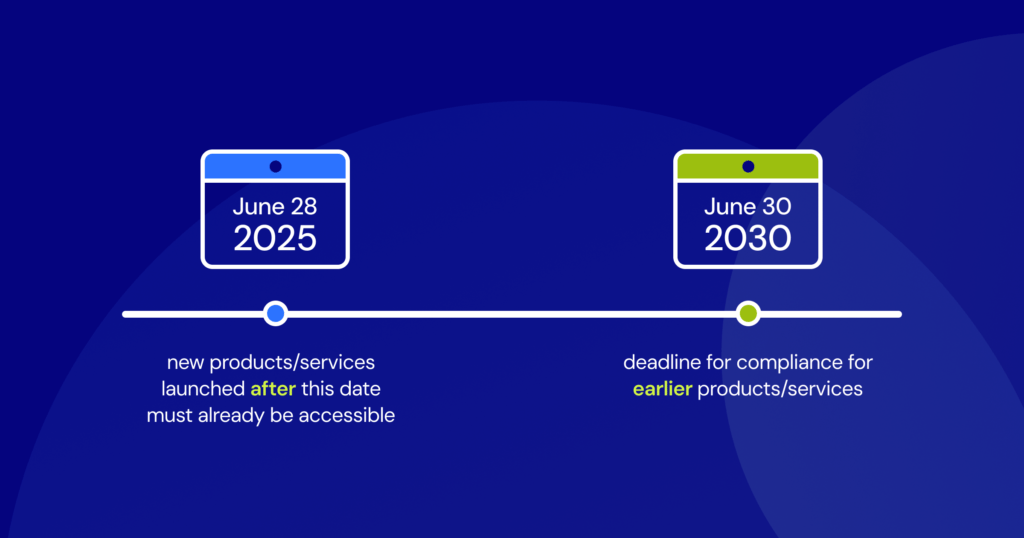
Anything launched after June 28, 2025 must be accessible at launch. That includes WordPress projects and WordPress-adjacent products.
- Launching a new e-commerce site in October? It needs to meet accessibility requirements immediately.
- Shipping a new plugin in November? It needs to be accessible out of the box.
There’s no “we’ll patch accessibility later” buffer for new launches. The expectation is simple: if you’re building now, you’re expected to build for everyone. That pushes accessibility into planning, design, and development-not a remediation sprint after you ship.
Existing services: transition period until June 28, 2030 (but you still need to act now)
For services that were already live before the June 28, 2025 deadline, the EAA sets a transition period. Those services must become fully compliant by June 28, 2030.
Calling this a grace period can be misleading. It’s better to think of it as a window for structured progress-because waiting creates real risk and real opportunity cost.
- Waiting puts you at a disadvantage. Accessible sites typically reach more people, can improve usability signals that matter for SEO, and help build trust. Delaying until the last minute means missing years of upside.
- Complaints can still trigger action. If a user with a disability files a complaint in 2026, authorities don’t have to wait until 2030. You’ll want a clear roadmap, documented improvements, and evidence that you’re actively working on accessibility. Doing nothing leaves you exposed.
- Major updates may reset your deadline. The transition period often doesn’t apply if you make “substantial modifications” to an existing service. The definition can be a gray area, but full redesigns, major e-commerce overhauls, or significant functionality changes could be interpreted as creating a “new” service-meaning immediate compliance expectations, not 2030.
Practical takeaway
Treat 2030 as the latest possible finish line, not the start date. The expectation is consistent, good-faith progress beginning now.
What happens if you’re not compliant? (How EAA enforcement typically unfolds)
EAA enforcement is handled at the EU member state level, so details can vary. But in practice, it usually plays out as a structured, consumer-driven process that nudges businesses toward compliance-then escalates if they ignore it.
How non-compliance gets flagged
Your site generally ends up on a regulator’s radar in one of two ways:
- Consumer complaints. The most common trigger is a user with a disability who can’t complete an action-buying a product, using a service, or accessing information. The EAA gives them a clearer legal path to complain to the designated national authority in their country.
- Market surveillance. Regulators can also run proactive audits, especially in high-impact verticals like e-commerce, banking, and travel. Your site can be flagged during these checks.
What happens next (usually not “instant fine”)
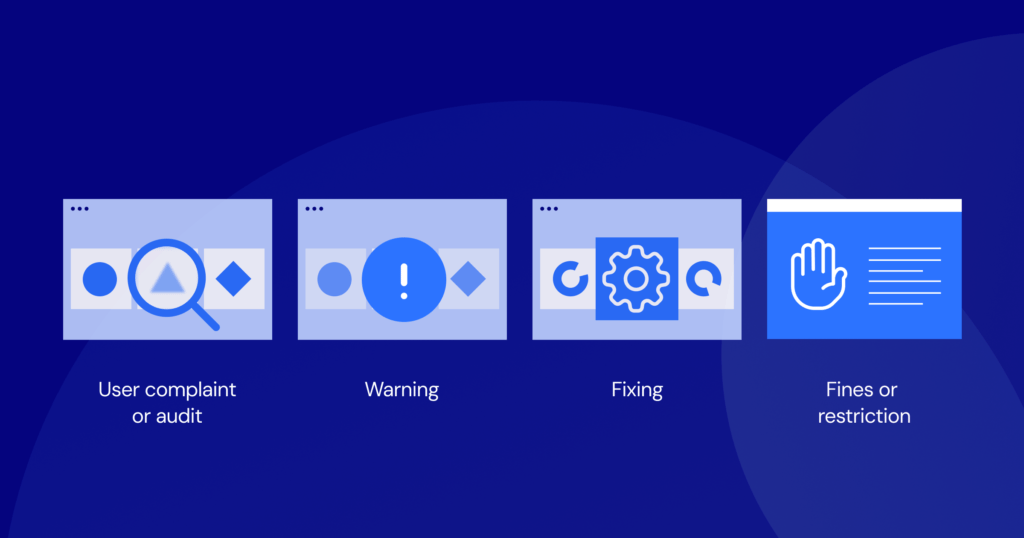
You typically don’t get a massive fine out of nowhere. The EAA’s goal is accessibility outcomes, so enforcement often starts with clear notice and time to fix issues.
- Notice of non-compliance. A national authority contacts you with the specific accessibility issues found and what parts of the EAA those issues violate.
- Deadline to fix. You’ll be given a reasonable remediation timeframe. This is not the multi-year transition period-it’s a much shorter, concrete deadline tied to the issues identified. The exact duration can depend on complexity.
- Escalation. If you ignore the notice and miss the remediation deadline, penalties can follow.
Potential penalties
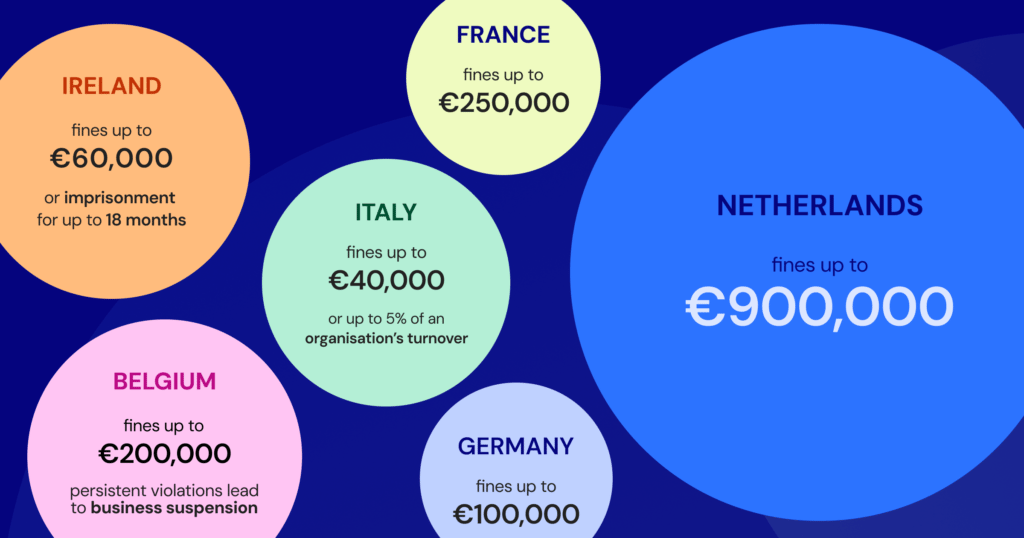
The EAA requires penalties to be “effective, proportionate, and dissuasive,” which is legal language for “serious enough to change behavior.” In practice, penalties can include:
- Substantial fines. These vary widely by country-ranging from a few thousand Euros to a percentage of annual turnover. Even “small” fines can hurt small businesses; for large companies, the numbers can be significant.
- Service bans or restrictions. Authorities may order you to stop offering the service to consumers in their country until you comply. Losing access to an EU market can be devastating for an online business.
- Withdrawal of products from the market. If you sell a digital product (for example, a WordPress plugin) that’s found non-compliant, you may be forced to pull it.
Personal and criminal liability can also exist in some member states for certain severe or repeated violations. It’s not the typical outcome, but it underscores how seriously accessibility is being treated.
Beyond legal exposure: brand damage
Legal penalties are the obvious risk, but reputational damage can linger longer. Being publicly identified as inaccessible can erode trust quickly-especially in competitive sectors where switching costs are low.
If you want to explore tooling that fits into a WordPress workflow, Elementor’s Ally product page is here: Make your site more accessible with Ally.
Why the entire WordPress ecosystem is affected
The EAA is broad legislation, but WordPress sites are built from components-core, theme, plugins, content, and custom code. That means responsibility is shared across the chain, even if enforcement ultimately lands on the business providing the service.
For WordPress site owners
If your site serves EU users, accessibility isn’t optional anymore-whether you sell products, offer services, or otherwise target an EU audience.
- You’re accountable. Penalties target your business-not the tools you picked.
- Every touchpoint matters. It’s not only the homepage. Accessibility must hold across the whole journey: product pages, contact forms, checkout, and support.
- Third-party tools count. Booking plugins, e-commerce extensions, form builders-if they introduce barriers, you still own the problem. Theme/plugin choices now have compliance implications.
Accessibility has moved into the same bucket as performance and security: a core business requirement, not a “nice-to-have.”
For agencies and freelancers
If you deliver WordPress projects professionally, clients will increasingly expect you to ship compliant experiences-whether they can articulate the requirements or not.
- Protect your clients. Many businesses don’t know what the EAA demands technically. Education plus implementation reduces their risk-and protects your reputation.
- Differentiate your service. Demonstrable accessibility expertise can be a competitive advantage in proposals.
- Adapt your workflow. Accessibility needs to be baked into design, development, and QA: theme selection, plugin vetting, and testing routines.
For plugin and theme developers
Themes and plugins can make or break compliance. The markup and UI patterns you ship become part of a customer’s legal and usability surface area.
- You’re part of the compliance chain. Unlabeled form fields, keyboard traps, non-keyboard sliders-these patterns create downstream risk for users.
- Demand is shifting. Agencies and site owners are actively looking for accessibility-ready tools. Documentation of conformance (for example, an Accessibility Conformance Report) is becoming a meaningful selling point.
- Inaccessible products will be dropped. Tools that block compliance will be replaced. Accessibility is now a long-term adoption factor, not just best practice.
For developers in the WordPress space, the EAA isn’t a burden; it’s a market opportunity. The creators who embed accessibility into the core of their products won’t just be compliant, they will become the default choice for a new generation of builders who see inclusivity as non-negotiable.
Itamar Haim
Again, for WordPress-first tooling focused on scanning, reporting, and workflow integration, see: Make your site more accessible with Ally.
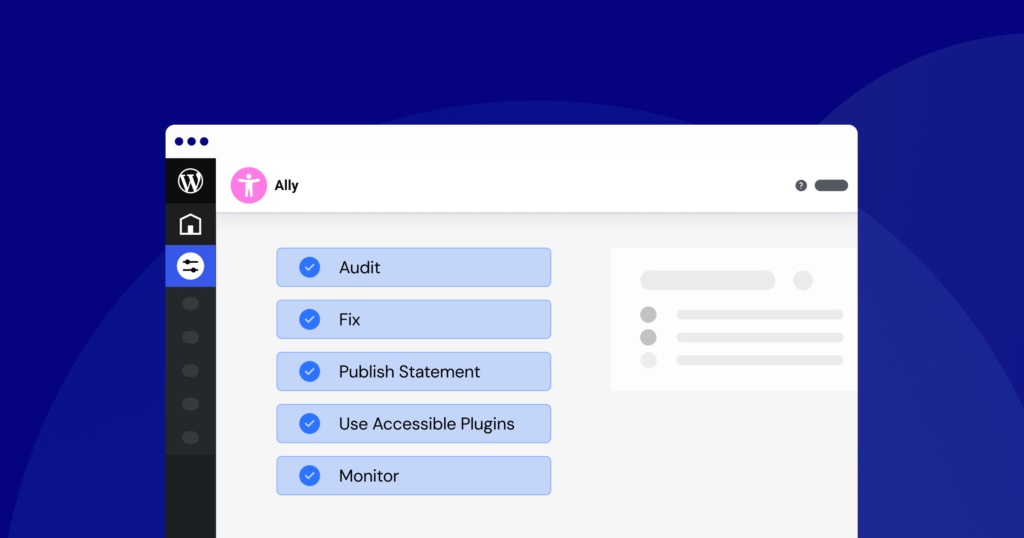
A 5-step WordPress accessibility plan you can start today
Accessibility work is easiest when it’s structured. You don’t need to solve everything in a single sprint, but you do need a repeatable system. Here are five steps that map well to how WordPress sites are actually maintained.
Step 1: Audit your website (automated + manual)
You can’t fix what you haven’t measured. A solid audit combines automated scanning (fast coverage) with manual testing (real usability).
- Automated scans. Automated tools catch common code-level issues quickly-low contrast, missing image alt text, form inputs without labels, and more. This can be done with browser extensions or dedicated WordPress tools. For example, Elementor’s Accessibility Assistant from Ally integrates into WordPress and scans pages against WCAG 2.1 AA (the technical benchmark commonly used to meet EAA expectations), then reports violations: Accessibility Assistant from Ally.
- Manual testing. Automation can’t judge whether the experience makes sense. Manual checks reveal usability problems and broken flows. Start with this baseline checklist:
- Keyboard navigation: Can you move through the entire site using only Tab? Can you reach every link, button, and form field? Is focus clearly visible at all times?
- Screen reader testing: Try NVDA (Windows), VoiceOver (macOS), or TalkBack (Android). Does the reading order make sense? Are images described properly? Are buttons/links labeled clearly?
- Content checks: Are headings structured logically (H1 → H2 → H3)? Is link text descriptive (e.g., “Read our full accessibility report” rather than “Click here”)? Is the copy written in plain language?
The output of this step is not “pass/fail.” It’s a prioritized backlog: what to fix first, what can wait, and where your biggest risks are.
Step 2: Fix high-impact issues first (quick wins that matter)
You don’t need to remediate everything at once. Start with issues that block completion of tasks and affect the widest set of users.
- Missing alt text on informative images. If an image carries meaning, it needs descriptive alternative text for screen reader users. This is one of the fastest high-value fixes.
- Low color contrast. Hard-to-read text is a major barrier for users with low vision. Use a contrast checker and aim for at least a 4.5:1 ratio.
- Vague link text. Replace “click here,” “learn more,” and “read more” with link text that explains the destination.
- Missing form labels. Every input in contact forms, login flows, and checkout needs a correctly associated label so screen readers can announce what’s required.
- Keyboard accessibility for all interactive elements. Anything clickable should be reachable and operable via keyboard-menus, modals, sliders, popups, and custom UI controls.
These fixes tend to produce immediate improvements without requiring a full rebuild.
Step 3: Publish an accessibility statement (and make it easy to find)
An accessibility statement is both a public commitment and a practical compliance artifact under the EAA. Typically, it should be linked in your footer and include:
- Your commitment to accessibility.
- The conformance standard you’re targeting (for example, WCAG 2.1 Level AA).
- Known accessibility issues you’re actively working on.
- Contact details so users can report problems.
This does two things: it signals transparency and good faith to users and regulators, and it creates a feedback channel so real users can report blockers you may miss in testing.
Step 4: Evaluate your theme and plugins (they define your UX constraints)
In WordPress, your accessibility posture is often determined by the theme and a handful of “core” plugins (forms, navigation, commerce, popups, sliders). Audit those components deliberately.
- Themes: Prefer an accessibility-ready theme with semantic HTML, correct heading hierarchy, and reliable keyboard navigation. If your current theme has systemic accessibility issues, switching may be cheaper than patching.
- New plugins: Before installing, check docs for accessibility notes. If needed, ask the developer about WCAG support. Be cautious with plugins that depend on visual-only interaction patterns (certain sliders or popup systems) if they don’t offer keyboard support.
- Existing plugins: Review what you already run. Are social share buttons keyboard-accessible? Do form builders output proper labels? Does anything trap focus or hide controls from assistive tech?
Think of this as supply-chain hygiene: you’re responsible for what your site outputs, even if a plugin generated it.
Step 5: Monitor continuously (accessibility is maintenance, not a one-off project)
Accessibility can regress every time you publish content, install a plugin, change a theme setting, or push a redesign. The only sustainable approach is to operationalize it.
- Content creation checklists: Give editors a simple checklist: alt text present, headings correct, links descriptive.
- Regular scans: Run automated scans monthly or quarterly to catch newly introduced issues.
- Provide user-facing tools: Consider adding a front-end usability widget that helps users adjust text size, contrast, and link highlighting. This can improve the experience and makes your accessibility commitment visible.
When accessibility becomes routine, you shift from reactive remediation to proactive prevention-which is where long-term compliance becomes realistic.
Wrap-up: the EAA changed the default-accessibility is now part of shipping
The “getting ready” phase is over. The EAA is already shaping how WordPress sites should be built, maintained, and extended-especially if you serve EU consumers.
The most defensible approach isn’t perfection overnight. It’s evidence of progress: run audits, fix high-impact barriers, publish a statement, vet your tooling, and keep monitoring as part of normal site operations.
Compliance is the baseline, but the upside is bigger than risk reduction. Accessible sites reach more users, improve the overall UX, and strengthen brand trust. Inclusivity is good engineering-and increasingly, it’s required engineering.
Key takeaways
- The EAA is in effect: Since June 28, 2025, accessibility is mandatory for websites serving EU consumers.
- Immediate vs. phased compliance: New services must be compliant at launch; existing ones have until 2030 but are expected to show progress now.
- Enforcement has teeth: It often starts with warnings and remediation deadlines, but can escalate to fines, restrictions, or product withdrawal.
- Responsibility is shared: Site owners, agencies/freelancers, and plugin/theme developers all influence compliance outcomes.
- A clear plan exists: Audit, fix high-impact issues, publish an accessibility statement, evaluate your WordPress stack, and monitor continuously.
- Accessibility is an advantage: It improves reach, usability, SEO signals, and brand trust-beyond legal compliance.
Frequently Asked Questions (FAQ)
1. Does the EAA apply to my small business blog if I don’t sell anything?
It depends on your business model. The EAA applies to products and services offered to consumers in the EU. If your blog is a hobby and doesn’t offer any services, it likely falls outside the scope. However, if your blog is part of your business (e.g., you’re a consultant and the blog is your marketing tool) and you serve or target EU clients, then yes, it applies. The key is the commercial nature of the activity.
2. What is the difference between the EAA and the WCAG?
Think of it this way: the EAA is the law, and the WCAG (Web Content Accessibility Guidelines) is the technical standard used to meet the law. The EAA mandates that websites and services must be accessible. It then points to technical standards like WCAG 2.1 Level AA as the benchmark for how to achieve that accessibility. To comply with the EAA, you need to conform to WCAG.
3. Can a single plugin make my entire WordPress site 100% compliant?
No, and you should be very wary of any tool that claims it can. Full accessibility compliance is a combination of technology, content, and design. A plugin can be an incredibly powerful assistant-it can scan your site for errors, help you fix them, generate an accessibility statement, and provide user-facing tools. But no automated tool can fix everything. For example, a tool can tell you if an image is missing alt text, but it can’t know if the alt text you wrote is actually meaningful and accurate. True compliance requires a combination of good tools and human oversight.
4. I’m a US-based company with no physical presence in the EU. Does the EAA still apply to me?
Yes, if you offer your products or services to consumers located in the EU. The EAA’s reach is based on the location of the consumer, not the location of the business. If an EU resident can buy your products, subscribe to your service, or download your app, you are expected to comply with the EAA.
5. How much will it cost to make my WordPress site accessible?
The cost can vary widely depending on the size and complexity of your site, its current state of accessibility, and the approach you take. If you are just starting and have a simple site, the cost might be minimal-mostly the time it takes to learn the basics and make fixes. For a large, complex e-commerce site with years of legacy content, the process will be more involved. However, investing in good tools and building accessibility into your workflow from the start is almost always cheaper than a major remediation project or a potential fine down the road.
6. I used an automated scanner and it said my site is 100% compliant. Am I safe?
Not necessarily. Automated scanners are essential, but they can only detect about 30–40% of all potential accessibility issues. They are excellent at finding technical problems in the code but cannot evaluate many human-centric aspects of usability. For example, they can’t tell you if your content is confusing, if your keyboard navigation flow is illogical, or if your alt text is genuinely helpful. You must combine automated scans with manual testing to get a complete picture.
7. What is an accessibility statement and do I really need one?
An accessibility statement is a public page on your website that communicates your policies and commitment to accessibility. Yes, you absolutely need one. It is a specific requirement of the EAA. Your statement should outline your target level of conformance (e.g., WCAG 2.1 AA), list any known issues you are working to fix, and provide contact information for users who encounter problems. It demonstrates transparency and a good-faith effort to comply.
8. My website’s theme claims to be “accessibility-ready.” Is that enough?
It’s a great start, but it’s not the whole story. An accessibility-ready theme provides a solid foundation with clean code, proper heading structures, and good keyboard navigation support. However, your site’s overall accessibility also depends on the content you add, the plugins you install, and the customizations you make. Using an accessible theme is a critical first step, but it doesn’t absolve you from the responsibility of ensuring everything else on your site is also accessible.
9. How often do I need to conduct an accessibility audit?
Accessibility isn’t a one-time project; it’s an ongoing commitment. A full, in-depth audit is a good idea every 12–18 months, or after any major site redesign. However, you should integrate smaller, more frequent checks into your regular workflow. For example, run an automated scan every quarter and perform a quick manual keyboard check after every significant plugin update or content addition.
10. Where can I find reliable resources to learn more about web accessibility?
There are many excellent resources available. The official WCAG documents from the W3C are the definitive source, though they can be quite technical. For more user-friendly guidance, look to organizations like the Web Accessibility Initiative (WAI), WebAIM (which has excellent articles and checklists), and accessibility-focused blogs from experts in the field. Many accessibility tool providers, including Elementor with its Ally resources, also offer educational content to help guide users on their accessibility journey.
Emma Richardson
UI/UX designer and frontend developer. React and the modern JavaScript ecosystem are my expertise. Passionate about user experience and accessibility.
All posts